Chris Blum, home

Karoo Flow

An internal care platform for a value-based cardiology company — replacing a clunky EMR, a stack of spreadsheets, and half a dozen third-party tools with a task engine built around what the care team should do next.

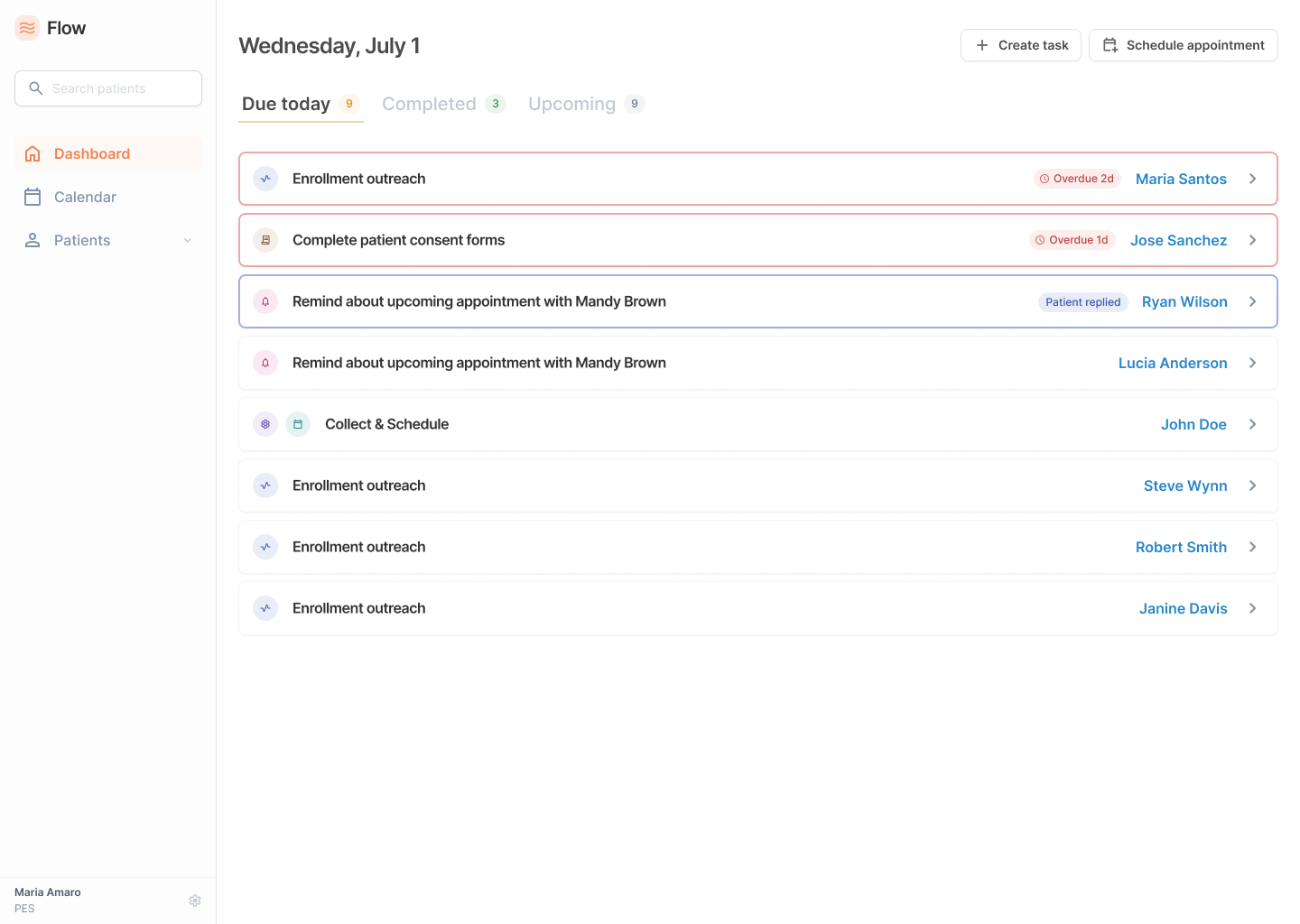
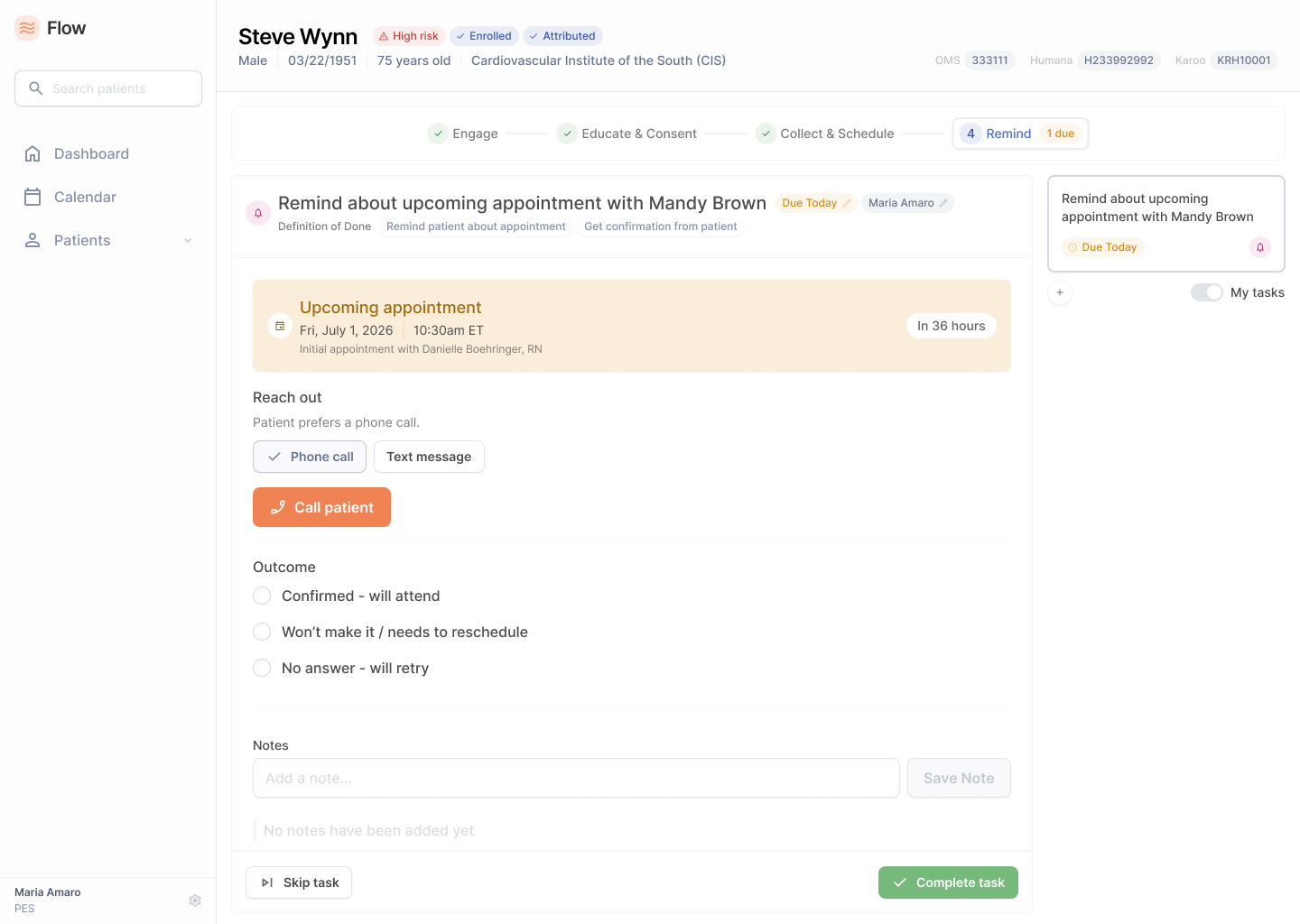
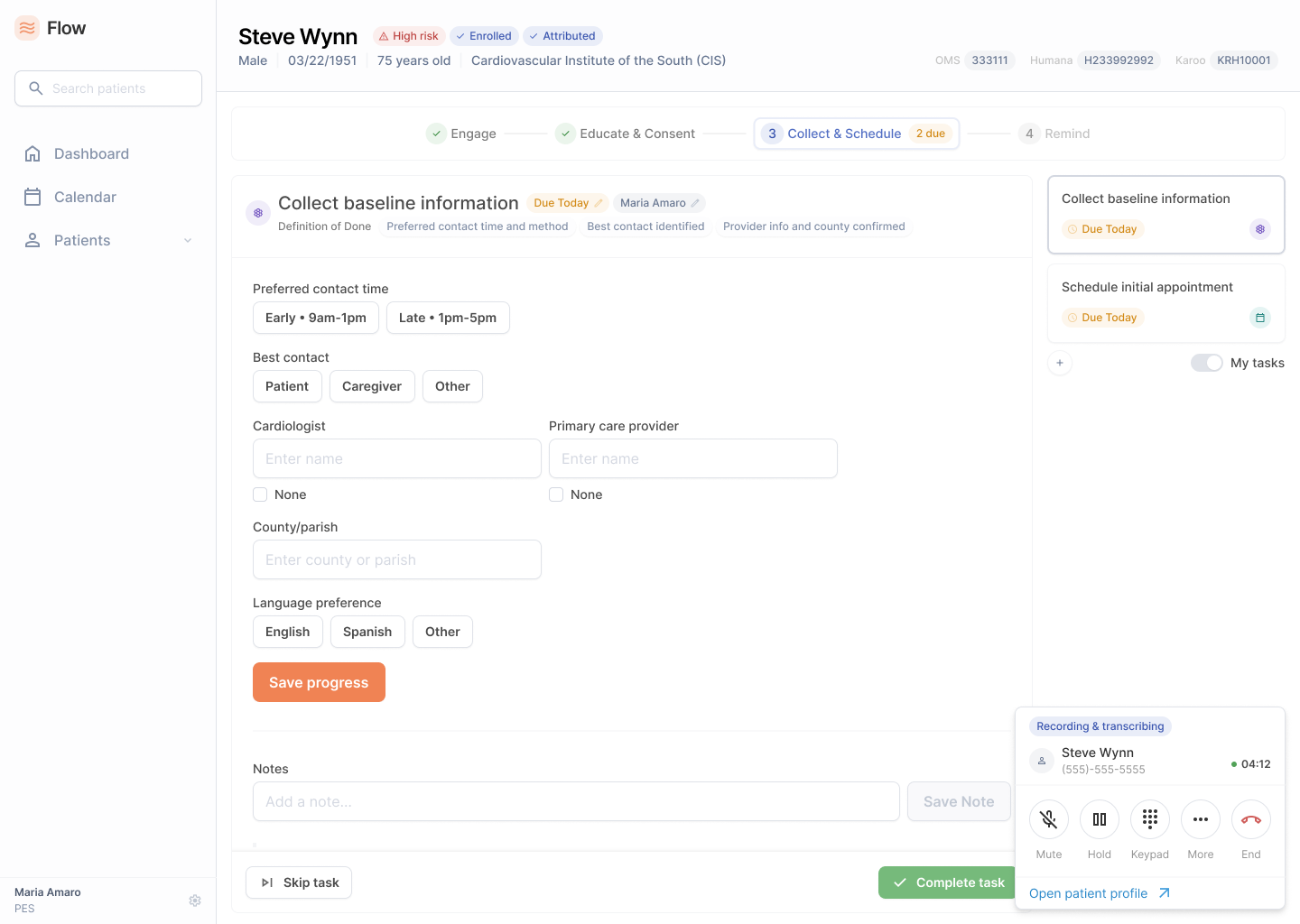
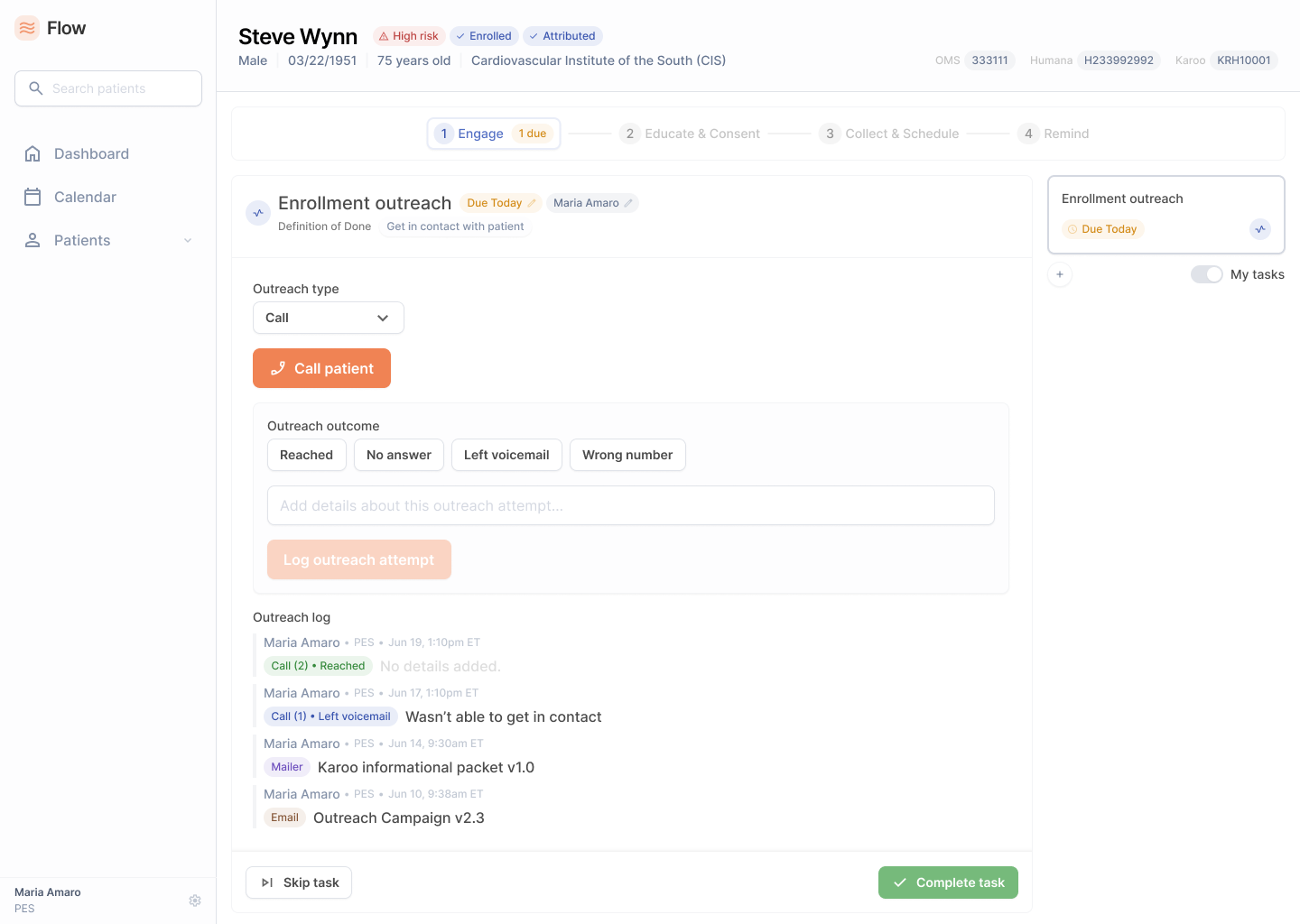
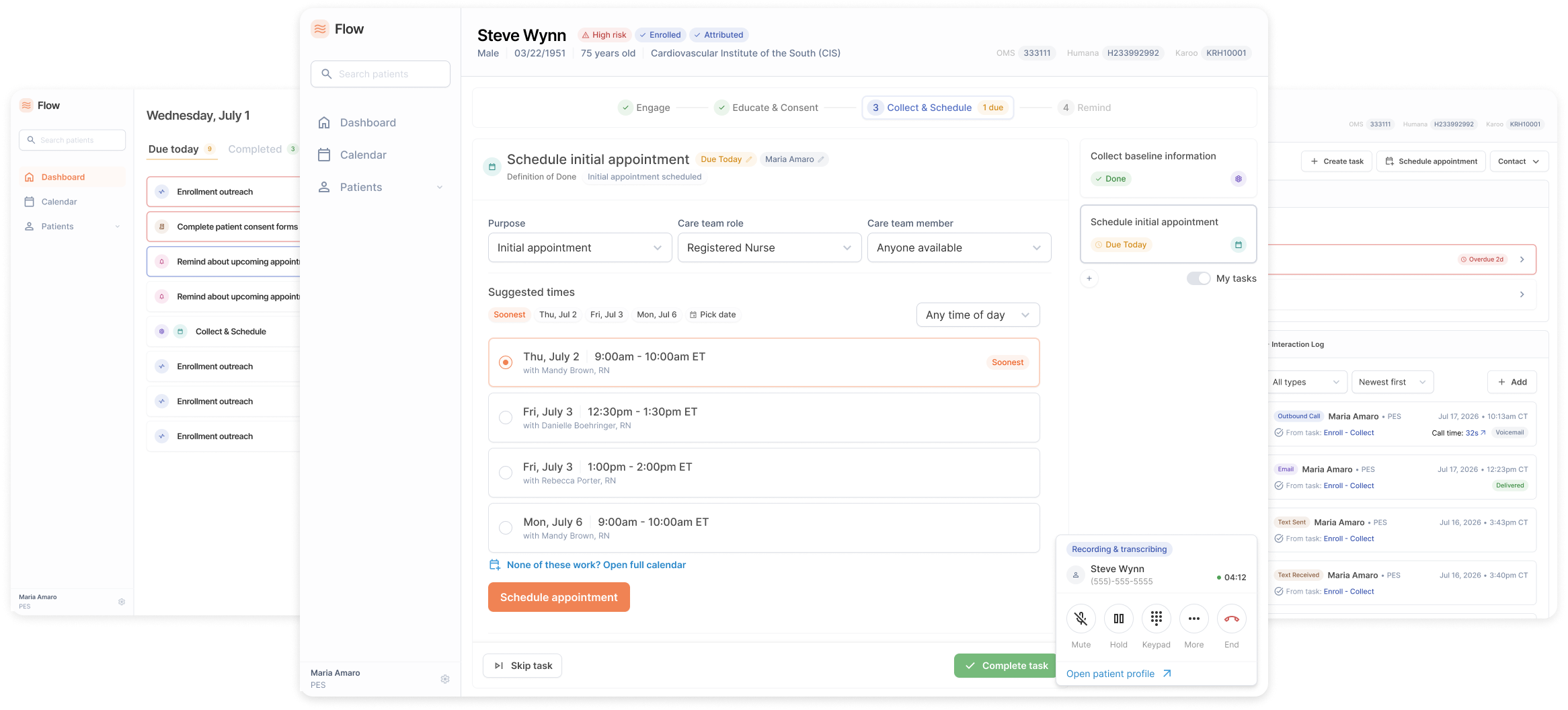
Karoo Flow: the dashboard, a scheduling task with the call widget, and a patient's interaction log
Timeframe
Jan 2026 – Jul 2026
Company
Karoo Health
Scope
Product Design, Product Management, System Architecture
Deliverables
Wireframes, Hi-Fi Mockups, Prototypes, Design System, PRDs

The short version

Five disconnected systems became one task engine.

Karoo's care team was running enrollment out of five disconnected systems, and the only way to serve more patients was to hire more people. I led product design and product management on the replacement: a platform that models every piece of care team work as tasks within workflows, so the system always knows what the next step is and who should take it.

5 → 1Systems an enrollment touched, replaced by one platform
6 of 20+Task types built for the MVP, from a model designed for the whole care organization
BetaA small cohort of real patients, enrolled end to end without leaving the platform

The company

An enablement layer between health plans and cardiologists.

Karoo Health is a value-based care company in the cardiovascular space. The goal is to reduce the total cost of care while holding health outcomes flat or better, through targeted interventions on both patient and provider behavior.

Read more

Karoo Health is a value-based care company in the cardiovascular space. It sits as an enablement layer between health plans — Zing Health and Humana — and the provider groups whose cardiologists see patients. It also employs its own clinical team of nurses, dietitians and social workers who hold appointments with patients directly.

The goal is to reduce the total cost of care while holding health outcomes flat or better, through targeted interventions on both patient and provider behavior. It's been done in oncology and nephrology. Cardiology is next.

Health plans attribute patients to Karoo, and Karoo reaches those patients two ways at once: by enabling the provider groups whose cardiologists treat them, and through its own care team of nurses, dietitians and social workers who support patients directly. The two lanes exchange patient data in both directions to co-manage the same patients, and outcomes and cost savings flow back to the plans. Attribution Enablement Care delivery Patient support Shared patient data Outcomes held or improved · total cost of care down Health plans Zing · Humana Karoo Enablement layer Provider groups Cardiologists & care teams Karoo care team Nurses · dietitians · social workers Patients Health plans attribute patients to Karoo, and Karoo reaches those patients two ways at once: by enabling the provider groups whose cardiologists treat them, and through its own care team of nurses, dietitians and social workers who support patients directly. The two lanes exchange patient data in both directions to co-manage the same patients, and outcomes and cost savings flow back to the plans. Attribution Enablement Shared data Care delivery Patient support Outcomes held or improved, total cost of care down Health plans Zing · Humana Karoo Enablement layer Provider groups Cardiologists Karoo care team Nurses · dietitians Patients

My role

Product design and product management, end to end.

I joined Karoo as Director of Product Design in 2025 and lead both product design and product management for Flow.

  1. Product Design

    Wireframes to get ideas on paper early, iterated into pixel-perfect mockups in Figma on a design system built for this project, linked into interactive prototypes that were used for user testing and winning stakeholder support.

  2. Product Management

    PRDs specifying how every workflow in the platform should function — engineering requirements, data and reporting requirements, and the rationale for why we were building it that way.

  3. System Architecture

    Co-defined the platform's hierarchy and taxonomy with the CTO, COO, VP of Engineering, and the clinical operations team across onsites and remote working sessions.

The approach

The bet

A task engine with a next step, not a repository of data.

Instead of reinventing a care management platform, we built something aggressively task-oriented: identify the exact patients who need a specific thing done at a specific time, and put that thing in front of the right person.

Read more

The repository model is fine in some practices: a holistic view of a patient that enables customized care for the infinite variety of potential health issues a person may be dealing with. It is the wrong model for a value-based care company in cardiology, where the entire game is delivering very specific interventions to specific patients at the right time. Not handling every problem a patient may have, but solving the subset of problems that we can both have an impact on and that drive down total cost of care.

So instead of reinventing a care management platform, we built something aggressively task-oriented: identify the exact patients who need a specific thing done at a specific time, and put that thing in front of the right person. Everything the care team does, even the genuinely complex multi-step work that spans patients, providers, and internal coordination across nurses, social workers, and dietitians, can be modeled as a workflow or a series of workflows. Inside any workflow are individual tasks that move it along.

Designing for automation we hadn't built yet

Today's AI and LLM tools aren't good at owning a full end-to-end clinical workflow, and in a lot of cases we wouldn't want them to. Certain interactions with patients are better done by a human with real cardiovascular expertise, someone who can listen and be empathetic to that patient's situation. But plenty of other work could be handled by a system: sending reminders, rescheduling appointments, the self-encapsulated administrative pieces.

For example, a five-task workflow might have two tasks a system can drive and three where our care team should stay firmly in the loop. Modeling the work as individual tasks is what makes AI-automated integration possible later.

Owning the tool stack

The other half of the bet was absorbing the third-party tools. In a startup it's normal to accumulate a pile of them, and each one makes you build your workflow around someone else's product. Pulling texting and calling into the platform meant we could design them the way the care team actually needs them to work, cancel a set of subscriptions, and stop paying the tax of working around external constraints.

The commodity model

A repository of patient data

  • Holds everything known about a patient
  • Optimized for browsing and charting
  • Leaves the user to chart their own path
  • No opinion about what happens next
  • Scales by adding more people to read it
What we built

A task engine with a next step

  • Surfaces the specific intervention this patient needs
  • Optimized for completing a discrete unit of work
  • Focuses the team on what to do now
  • Always produces the next step
  • Scales by making each person's time go further
The same five sources now feed one task engine, Karoo Flow, in step; the engine hands the care team a single next step. Patient record Calling Texting Work tracking Scheduling Karoo FlowTask engine Care teamThe next step The same five sources now feed one task engine, Karoo Flow, in step; the engine hands the care team a single next step. Patient record Calling Texting Work tracking Scheduling Karoo FlowTask engine Care teamThe next step

Product principles

Three themes I heard over and over again.

What came out of my research process were a handful of common themes, codified into a set of guiding principles that served as a north star as the team moved through the MVP.

  1. Clinical judgment overrides automation

    The system can recommend, prioritize, and route work — but humans remain the decision-makers, especially in clinical contexts.

    Where it showed upWorkflows guide but never dictate. A PES can work tasks out of order mid-call.

  2. No patient is average

    There's no single comprehensive journey, only next steps and transitions. We build tools flexible enough for the full range of patients we encounter.

    Where it showed upOverride capability during scheduling that allows the booking of a social worker instead of a nurse when SDOH needs surface on a call.

  3. Targeted, not open-ended

    Every interaction should have a clear purpose. We give the team a focused toolkit and clarity on what to do next, not an open-ended set of options.

    Where it showed upThe whole task-engine bet — a next step instead of a data repository.

The solution

Defining the system

One model for everything the care team does.

The taxonomy gave structure to the product, and served as a shared vocabulary between engineering, clinical operations and leadership as we iterated. It's deliberately bigger than anything we planned to build for an MVP.

Read more

The platform needed one model that could hold everything the care team does, not just enrollment. Getting there took several onsites and a lot of remote sessions with the engineering team, clinical operations team, and the leadership group. This taxonomy not only gave structure to the product we were building, but also served as a "shared vocabulary" between the different teams as we iterated.

Where we landed: a patient is the top-level object. A patient can be assigned to one or more pathways, each a high-level block of work that could span months or years. Examples of pathways might be health condition specific (like Heart Failure or Diabetes), intervention specific (like GDMT, guideline-directed medical therapy, which covers getting a patient onto the right medications and every touchpoint with them and their providers along the way), or more business objective oriented (like Patient Enrollment).

Inside a pathway are workflows, each a discrete set of tasks organized into stages. For example, within the Enrollment pathway, you would have 2 workflows: an Outreach workflow (getting in touch with the person and enrolling them in the Karoo Program), and then an Onboarding workflow (sending them a welcome kit, getting the patient app downloaded, etc).

Inside a workflow are tasks - the individual units of work that move the workflow along. For example, a workflow for patient lab work, might have individual tasks for coordinating the blood draw, reminding the patient of their lab appointment, reviewing the lab results, discussing the lab results with the patient, and sending a note to their doctor if anything abnormal pops up.

The model is deliberately bigger than anything we planned to build for an MVP. We had a vision for what we were building toward longterm, but the next decision was which slice of it to ship first.

Patient → Pathway → Workflow → Stage → Task

One enrollment, traced through every level of the model.

  • PatientThe top-level object. A patient can be assigned to one or more pathways.Steve Wynn
    • PathwayA high-level block of work that could span months or years: a condition, an intervention, or a business objective.Enrollment
      • WorkflowA discrete set of tasks organized into stages.PES Enrollment
        • StageA checkpoint. Stages guide; they never gate.1 · Reach
          • TaskThe individual unit of work that moves the workflow along.Engage

The MVP

80% of one team's work, not 10% of everyone's.

The Patient Engagement Specialists are a small team doing a narrow, repeatable set of work, and most of their time goes to one thing: getting attributed patients enrolled. Enrollment starts and finishes with the PES, and nothing downstream has to exist for it to be worth doing.

Read more

Why the PES team

The Patient Engagement Specialists are a small team doing a narrow, repeatable set of work, and most of their time goes to one thing: getting attributed patients enrolled. That work is a workflow in the truest sense — the same sequence, in roughly the same order, for nearly every patient. It's also self-contained. Enrollment starts and finishes with the PES, and a patient enrolled is a patient we can actually go do something for. Nothing downstream has to exist for it to be worth doing.

The alternative was building the whole universe

Nurse and care-team workflows are the opposite. What a nurse does next depends on that patient's diagnosis, its severity, their medications, what happened on the last call. Serving them meaningfully would have meant building most of the taxonomy at once — multiple clinical pathways, most of the task types, the coordination surfaces between roles. Months of work before anyone could do their actual job in the platform.

80/20 Principle

So we covered roughly 80% of one team's core workflow instead of 10% of the full team's. Enrollment is about 80% of the PES job, so building the enrollment process in full covers it. The other 20% is everything adjacent to enrollment but not part of it — a patient calling in to reschedule, assorted administrative work.

To cover that 80%, we built: a dashboard that answers what am I supposed to be doing, a task action view where the work gets completed, a patient profile every task reads from and writes back to, and search, because sometimes a patient calls you.

What we shippedThe PES team's core workflow, in full
PESNursesSocial workDietitians
80%
The alternativeA thin slice of every role
PESNursesSocial workDietitians
10%
The four surfaces the MVP built: the dashboard surfaces work into the task action view, completed work resurfaces the next task, the task action view writes back to and reads history from the patient profile, and search goes straight to a patient's profile without the dashboard. Completed work resurfaces the next writes back reads history Dashboard Where work gets surfaced Task action view Where work gets completed Patient profile Where everything is stored Search Straight to a patient, no dashboard The four surfaces the MVP built: the dashboard surfaces work into the task action view, completed work resurfaces the next task, the task action view writes back to and reads history from the patient profile, and search goes straight to a patient's profile without the dashboard. Completed work resurfaces the next writes back reads history Dashboard Surfaces work Task action view Completes work Patient profile Stores everything Search Skips the dashboard
The four surfaces we built for that 80%
Flow dashboard listing the tasks due today
1 2 3 4

The dashboard

The answer to "what am I supposed to be doing today?"

  1. Due today, upcoming, completedWork is grouped by when it needs doing.
  2. Overdue is flagged in placeA slipping task stays in the list, marked with how late it is.
  3. Patient replies surfaceA reply to a reminder shows on the task itself.
  4. One row, any task typeOutreach, consent, scheduling and reminders share one list.

What we cut

Scope discipline is most of what an MVP actually is.

Designed → cut

The single-task page

A focused view for tasks that stand alone. We cut it because every MVP task can be completed from the workflow view. Strip the context out and a PES loses the ability to move between tasks mid-call, which is exactly what enrollment requires.

Designed → cut

The in-platform calendar

We'd integrated Nylas for scheduling, and Nylas syncs to Google Calendar, where the team could already see everything. So we built the scheduling UI constraint system and no calendar to look at.

Designed → cut

The dynamic cohort builder

The operations process wasn't defined tightly enough to automate, and building cohorts by hand in the platform was scope creep against the MVP's goal. We cut it in favor of simply ingesting the operations spreadsheet.

Read the full reasoning

The single-task page

A focused view for tasks that stand alone — a reminder doesn't need a whole workflow around it. We cut it because every MVP task can be completed from the workflow view, and the extra context isn't harmful when it isn't needed. The reverse isn't true: strip the context out and a PES loses the ability to move between tasks mid-call, which is exactly what enrollment requires.

The in-platform calendar

We'd integrated Nylas for scheduling, and Nylas syncs to Google Calendar, where the team could already see everything. So we built the scheduling UI constraint system and no calendar to look at.

The dynamic cohort builder

Enrollment campaigns come from an operations spreadsheet built on criteria that shift from campaign to campaign - these campaigns dictated which patients the PES team would reach out to. The obvious move was to have the system generate those lists itself.

Working with the operations team made clear their process wasn't defined tightly enough to fully automate, so we initially designed a middle path that would allow cohorts to be built within the platform manually. Cool feature, but ultimately I felt like this was scope creep - this functionality wasn't necessary to satisfy the underlying goal of the MVP: get the PES team what they need to complete enrollments. So we cut that too, in favor of simply ingesting the spreadsheet.

The enrollment workflow

Stages guide. They never gate.

Four stages serve as checkpoints, and tasks are the units of work that get you there. But a real call doesn't follow the stages, so the system keeps up rather than objects: a task outside the current stage never locks.

Read more

The core workflow that we built for the PES team was the Enrollment workflow. It's made up of four stages that serve as checkpoints - each stage should be completed before the next one makes sense - and tasks are the units of work that get you there.

Early in a call, while the PES is still establishing who Karoo is, patients routinely start volunteering information about their cardiologist and their other doctors. That's Collect, a stage three task. The PES is nominally still in stage one or two — the patient hasn't consented, the education isn't finished — but the information is being offered right now, and the only sensible thing to do is write it down. It happens again a few minutes later. The PES explains how Karoo will interact with them, and the patient answers with when they want to be called. Also Collect. Also out of order.

The system's job is to keep up rather than object, so a task sitting outside the current stage never locks it.

  1. 1Reach the patientEngage
  2. 2Enroll them in KarooEducateConsent
  3. 3Book the first appointmentCollectSchedule
  4. 4Confirm they'll attendRemind

Task types

One task shell, a variable body.

A PES moves through five task types in a single phone call, while the patient is talking. The base structure never changes; the body is the only thing a task type defines. That keeps the fifth task in a call as legible as the first, and makes the next task type an addition rather than a redesign.

Read more

A task type determines what the platform renders. Consent is send-and-track. Collect is a set of structured fields. Schedule has a constraint picker. We defined 20+ so the model could support the whole care organization, and built the six PES enrollment needs for the MVP.

The problem is that those six aren't encountered one at a time. A PES moves through five of them in a single phone call, while the patient is talking. So each type has to be shaped for its own job, and none of them can feel like a different application.

One rigid template that every type fills in fits none of them well. Six customized screens fit perfectly, but cost you as the user has to readjust to where things are located at exactly the moment they can least afford to go looking — during the call with a patient. And the types we hadn't built yet would each be a from-scratch design later.

What we built is one task shell with a variable body. The base structure never changes — who the patient is, where you are in the stage, the Complete Task action, the call widget docked in the same corner. The body is the only thing a task type defines. That's what keeps the fifth task in a call as legible as the first, and what makes the next task type an addition rather than a redesign.

Of more than twenty task types defined, six were built for the MVP, filtered to PES enrollment: Engage, Educate, Consent, Collect, Schedule and Remind. 20+ task types defined MVP scope PES enrollment only 6 built for the MVP EngageEducateConsentCollectScheduleRemind Of more than twenty task types defined, six were built for the MVP, filtered to PES enrollment: Engage, Educate, Consent, Collect, Schedule and Remind. 20+ task types defined MVP scope PES enrollment only EngageEducateConsentCollectScheduleRemind 6 built for the MVP
Remind task: an upcoming appointment reminder by call or text
Body · Remind
RemindReminder by call or text, replies visible in the platform.
Collect task: structured fields for contact preferences and providers
Body · Collect
CollectThe same shell: patient, stage, Complete Task and the call widget never move.

Design details

Modeling the Engage task

One Engage task equals one outreach attempt.

A single task that accumulated attempts never completed, so a PES who reached out six times looked like they'd done nothing. Splitting each attempt into its own task, with every attempt in the stage shown as a shared log, fixed the story, the data model and the metrics at once.

Read more

We started with a single Engage task per patient that would accumulate attempts as the PES made them — the PES would continue outreach until actually successful, at which point the task would be complete. At some point, we pivoted to having multiple Engage tasks - one for each communication channel (one task for calls, one for emails, one for postal mail, etc). Three problems killed both approaches.

Problems with our initial approach

The story got lost. Outreach is multi-channel by design. We want to send an email about the program, follow with postal mail a couple of days later, then a series of calls after that. Split across per-channel tasks, nobody could see the full story of what had already been done.

Engineering pushed back on the data model. A cleaner model treats each Engage task as one discrete action — a single outreach attempt.

And the one nobody saw coming, which surfaced in testing with the PES managers: it broke the metrics. A task that accumulates attempts never completes. Under the old model, a PES could reach out to a patient six times and if productivity was measured against tasks completed versus tasks assigned, it looks like they'd done nothing at all. Their managers needed visibility into work actually performed.

The solution

One Engage task equals one discrete outreach attempt. The PES picks the channel, which changes the UI rendered for that task, then logs the outcome. If the attempt was unsuccessful, the system prompts them to create the next one at a later date, which surfaces on their dashboard that day. There's always a next step.

The full story is preserved by aggregation instead of by one big task. Every attempt in the same workflow stage renders as a log inside each individual Engage task. Email on this date. Postal mail on this date. A call that went to voicemail. Another attempt, no answer. Now you're making this third call — what was the outcome?

That resolved all three problems at once. The PES sees complete history, engineering gets the discrete model they wanted, and reporting reflects real effort. People get credit for the work they're doing even when we haven't gotten the outcome we want.

Earlier model

One Engage task accumulates five attempts and never completes. Engage open 6 outreach attempts · 0 tasks completed
  • The story got lost across per-channel tasks
  • Engineering wanted one discrete action per task
  • It broke the metrics: the task never completes

Revised model

Each attempt is its own Engage task, each completed, all sharing one stage log. EmailMailCallCallNow One shared stage log · every attempt visible in every task
  • The PES sees the complete history
  • Engineering gets the discrete model
  • Reporting reflects real effort
Engage task: outreach type, call action, outcome buttons and the outreach log
The Engage task: pick a channel, log the outcome, and every earlier attempt sits beneath itDetail, enlarged

Rebuilding scheduling

Why was a person doing constraint satisfaction at all?

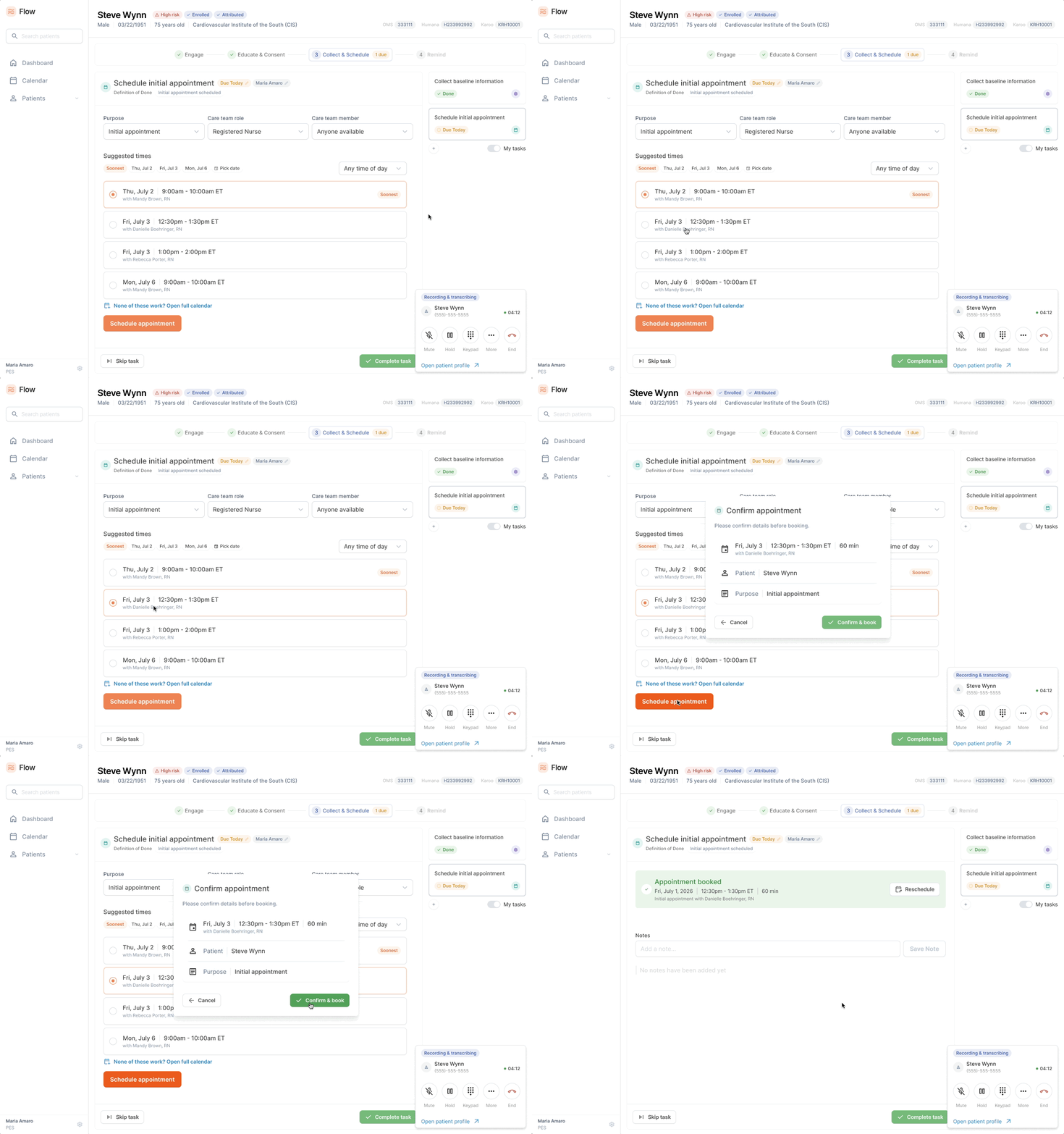
Scheduling had been causing problems for over a year: double bookings, time zone errors, and manual cross-referencing. So the system does the calculations instead, and surfaces suggested slots the PES can confirm while the patient is still on the phone.

Read more

Scheduling had been causing problems for over a year, and fixing it was an explicit goal of the MVP. The old scheduling system was calendar-based: find an open block, pick a time, hope. That produced double bookings, time zone errors, and a lot of manual cross-referencing to find out what time of day a patient actually preferred.

Stepping back

The reframe was asking why a person was doing constraint satisfaction at all. Our nurses are spread across the country on different hours, some work four days a week, state licensure limits which nurses can see which patients, and each region has a primary nurse with secondaries behind them. Nobody was going to hold all of that in their head reliably.

The solution

So the system does those calculations instead. It reconciles time zones, licensure, working hours, patient preference, existing bookings and nurse priority, then surfaces suggested slots the PES can confirm and book while the patient is still on the phone. Constraints act as defaults, not walls — overrides are always available, including booking a social worker instead of a nurse when SDOH needs surface mid-call.

Six constraints — time zones, licensure, working hours, patient preference, existing bookings and nurse priority — arrive together at the scheduling engine, which returns suggested times. Time zones State licensure Working hours Patient preference Existing bookings Nurse priority Schedulingengine Suggested slot Suggested slot Suggested slot Six constraints — time zones, licensure, working hours, patient preference, existing bookings and nurse priority — arrive together at the scheduling engine, which returns suggested times. Time zones State licensure Working hours Patient preference Existing bookings Nurse priority Schedulingengine Suggested slot Suggested slot Suggested slot
Scheduling task: suggested times that already satisfy every constraint, booked in a click
ScheduleSuggested slots that already satisfy every constraint, with overrides always available.

Design system

AI-developed, human-designed.

We built the design system before the product. With coding agents implementing against a defined system, a well-specified component is close to as fast to ship as an improvised one, and the system is what keeps AI-assisted output coherent.

Read more

Rethinking the process

We built the design system before we built the product for the same reason building was viable at all — the economics had changed. A few years ago that would have been overengineering, and the reason it isn't anymore is one of my most valuable takeaways from this project.

The team was three full-stack engineers who leaned backend, and me as the only product designer. Nobody to hand a redline to, nobody to absorb UI churn. By the old math, a full design system before an MVP is premature investment. You don't know what you need yet, half the components get thrown away, and a small team burns runway on polish before it has proof anyone wants the thing. That's the whole reason "ship the ugly version first" became default advice.

Building with AI

What changed is the cost of quality. With coding agents implementing against a defined system, a well-specified component is close to as fast to ship as an improvised one. The expensive part stopped being the building and became the deciding: what the component is, how it behaves, what it's called, what it does in every state. That's the part a model can't do for you, and it's exactly where a designer is already strong. And the reverse holds too: without a system to point at, an LLM will cheerfully generate a slightly different button forty times, every screen locally reasonable while the whole product is disjointed. A design system isn't overhead on top of AI-assisted development, it's what makes the output coherent.

So we built it first in Figma, using Figma MCP to connect Claude Code directly into the library, with Code Connect providing the mapping layer, so a component defined once is what the engineers actually get in code. The team spent far less time on frontend UI and could focus on backend and business logic, which is what they wanted to be doing anyway.

AI-developed, human-designed

The path from there was conventional even if the tooling wasn't. Wireframes first, to iterate early with the clinical and operations teams on what they actually needed. Then pixel-perfect mockups built on the system, with interactive prototypes covering real use cases end-to-end for user testing.

Polish isn't vanity in healthcare. There's an enormous amount of information in a clinical model, it's easy to hit information overload, and a poorly designed platform is exhausting to work in even when the workflows underneath it are right.
Figma → code

Every component mapped once, reused forever.

  1. Design systemBuilt first, in Figma
  2. Code ConnectThe mapping layer between library and code
  3. Claude CodeConnected to the library through Figma MCP
  4. Shipped UIWhat engineers get is the component defined once
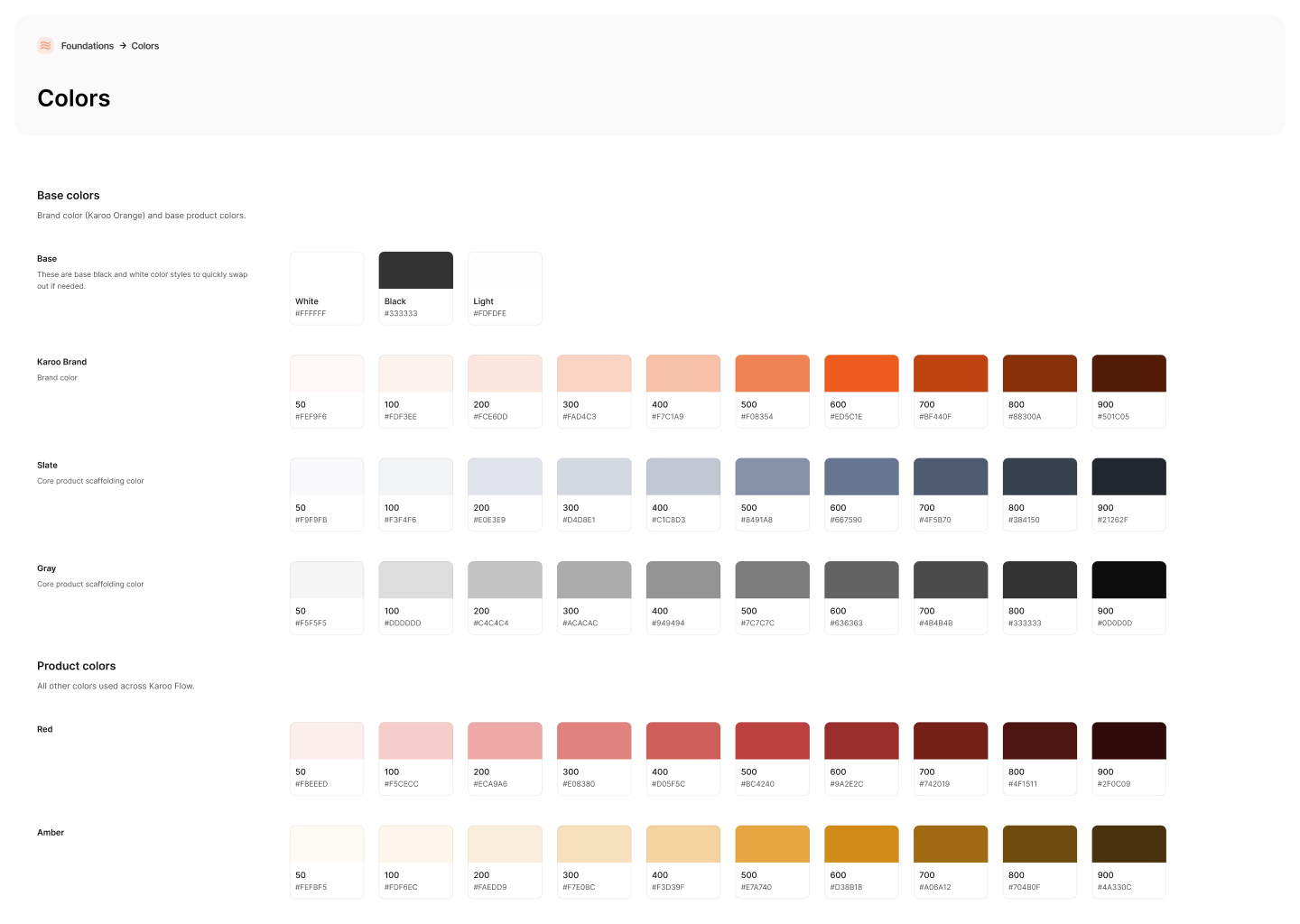
Design system: colour foundations
FoundationsBrand, slate and product colour ramps.
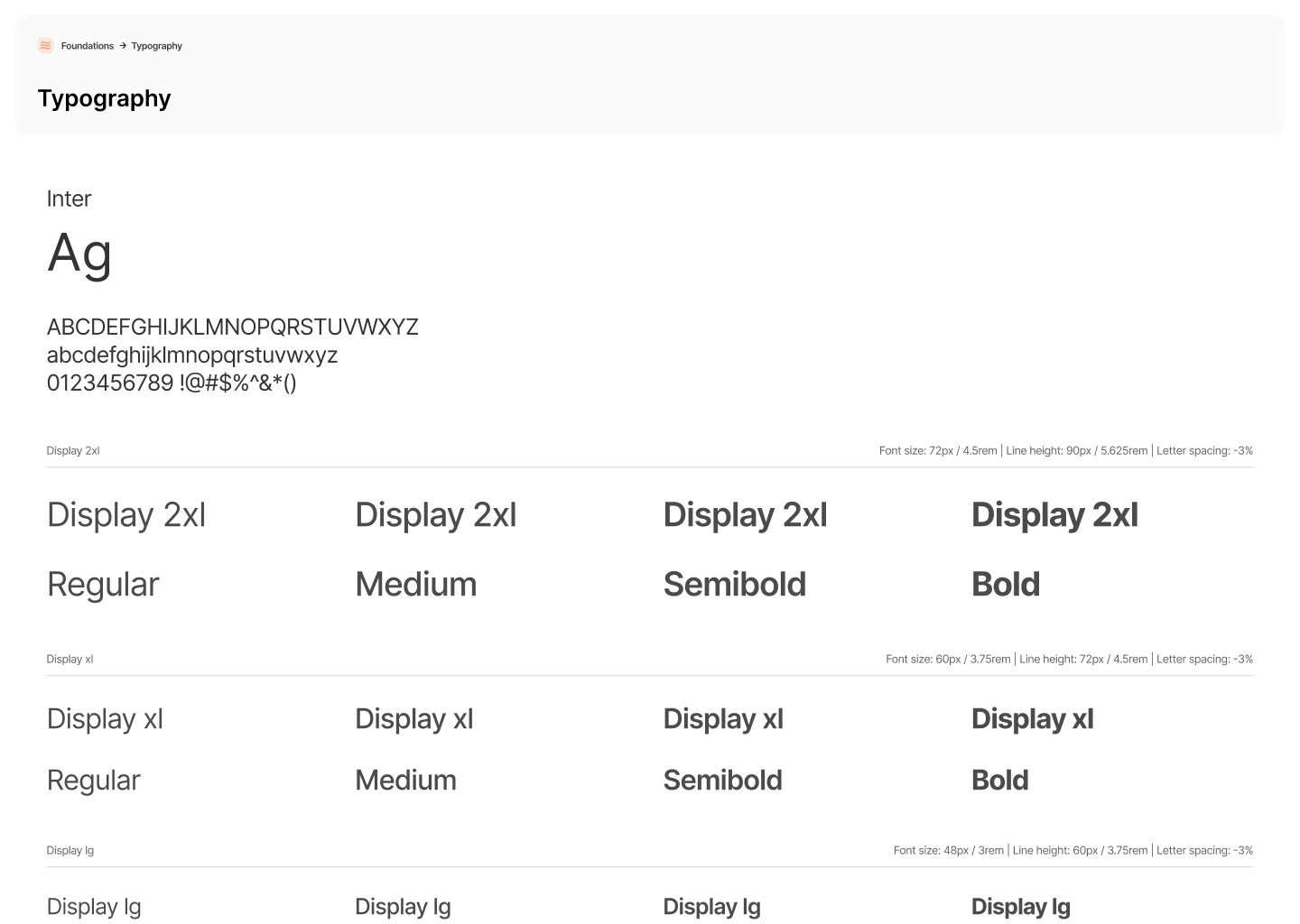
Design system page
ComponentsThe Figma library that let three backend engineers ship polished UI.

Final designs

Next project

Biomarker dashboard

Lab results patients can understand, and act on.